MAC sessions online – individual, group, training, and transformational games
A professional platform for working with metaphorical cards
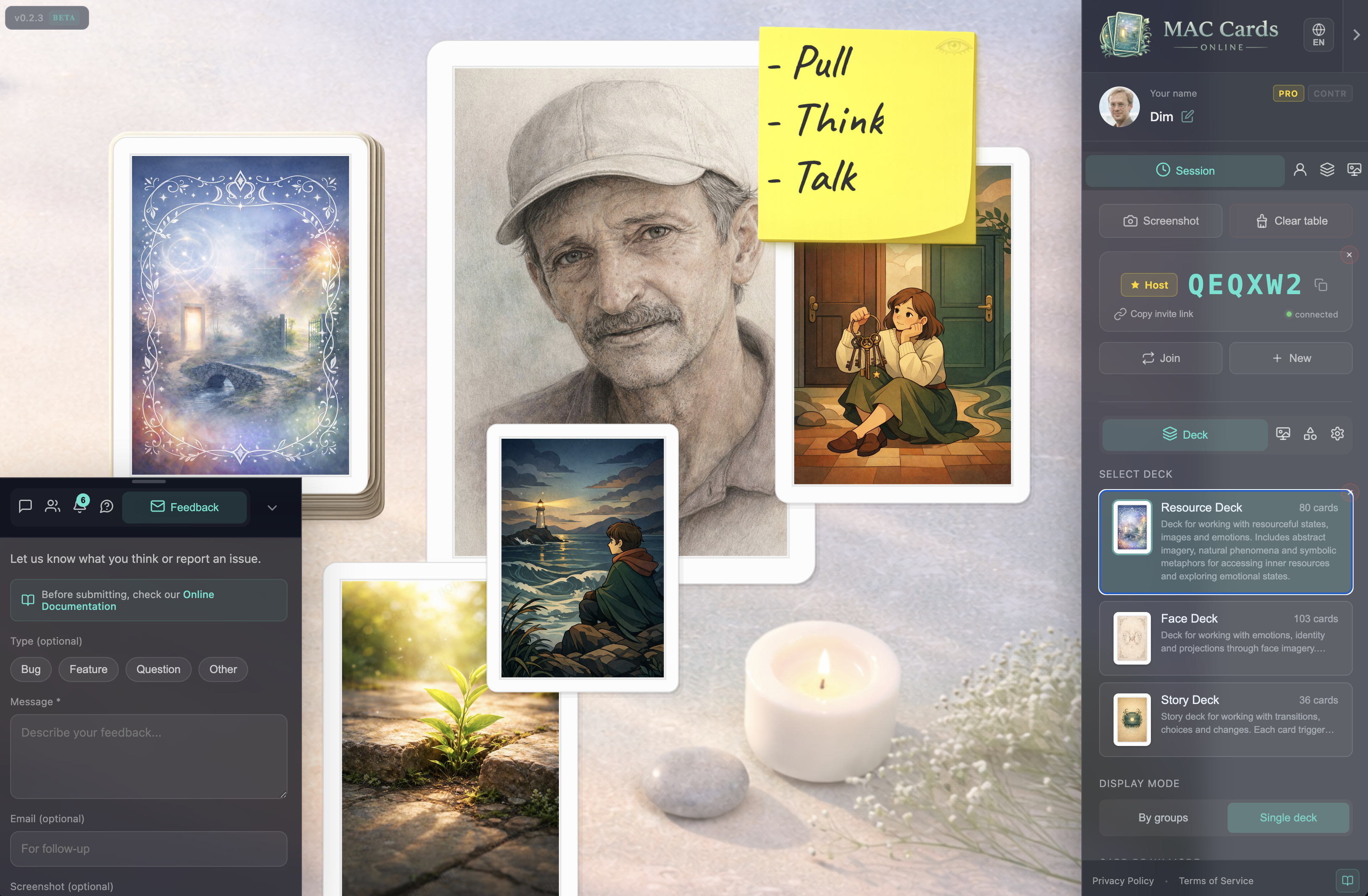
Four scenarios on one platform: 1:1 sessions with a client, group practice for up to 150 participants, trainings and workshops, and transformational games with tokens and dice. Everyone works on a shared interactive board in real time – right in the browser.
Four scenarios, one platform
From individual therapy to large-scale trainings – choose the format that fits your practice.
Individual session
1:1 work with a client. Anonymous notes keep the session safe – only you as the host see who wrote what. A private space for deep, focused work with metaphorical cards.
Group practice
Up to 150 participants on one shared board. The host controls card movement, cursors, and chat. Everyone interacts with the same cards in real time. Ideal for group therapy and supervision.
Training & workshop
Demonstrate techniques to large groups. Show how to work with specific decks and card layouts. Participants observe or interact as you direct – perfect for teaching and professional development.
Transformational games
Each participant gets a colored token (5 colors to choose from) and 1 six-sided die with server-generated rolls. The facilitator controls the shared board. A focused MVP for T-game formats – more mechanics are planned.


Without the platform
- Showing cards via camera – no interaction, participants can only watch
- No shared space for groups – everyone works in isolation
- Miro or whiteboards – no built-in decks, no roles, no card mechanics
- No anonymity for sensitive sessions – everyone sees everything
With MAC Cards Online
- Shared interactive board – everyone sees and interacts with the same cards
- Host controls rules and visibility – cursors, card movement, chat
- Anonymous notes for safe work – text visible, author hidden from other participants
- Built-in decks, rooms, tokens, and dice – everything in one place
How group work works
From creating a session to a fully synchronized shared board – in four steps.
Host creates a session
Pick a room and a deck. No sign-in required – anonymous hosts can create sessions and control the board. Optionally sign in for private mode or set a password (PRO/Premium).
Share the link
Send the session link to participants via any messenger or email. They open it in the browser and join instantly – no installation, no registration.
Shared board syncs
Everyone sees the same board in real time. Cards, notes, and chat sync across all participants. Draw cards, write notes, discuss – all on one shared canvas.
Host controls the process
Hide participant cursors, restrict card movement to own cards, disable chat – these controls require an account or PRO. Set note modes (anonymous, public, or private) to match the session format.
Host control & safety
Every host has tools to manage the session. Some advanced controls require sign-in or PRO status.
Hide cursors
Hide other participants' cursors so they don't distract during focused work. PRO or Premium required.
Move own only
Restrict card movement so each participant can only move their own cards. Prevents interference in group work. PRO or Premium required.
Disable chat
Turn off the chat when you need full focus on the cards and the process. Requires a signed-in account.
Anonymous notes
Everyone sees the note text, but only the host sees who wrote it. Safe for sensitive topics where anonymity matters. Available to any host.
Private mode
Hide your session from the public session list. Only people with the direct link can find it. Requires a signed-in account (Google).
Password
Set a password so only invited participants can join. An extra layer of protection for confidential sessions. Requires PRO or Premium status.
Transformational games
Built-in game pieces for T-game formats, with a deliberately narrow scope.
Colored token per participant
5 colors to choose from. Each participant places and moves their token on the shared board. The facilitator sees all tokens and manages the game flow.
1 six-sided die (d6)
Server-generated rolls ensure fairness – no client-side randomness. Results are visible to all participants in real time. One die per participant.
Shared board with facilitator control
The facilitator manages the board, controls who can move cards, and guides the game process. Combined with host controls (cursors, movement, chat), this gives you full authority over the session.
Transformational game support has a narrow scope: a colored token (5 colors) and a d6 per participant.
Features for professionals
Everything you need to run MAC sessions – from individual therapy to large-group trainings.
Shared interactive board
Everyone sees and interacts with the same cards in real time. Draw, flip, move, and arrange cards together on a single synchronized canvas. The core of every session format.
Three note modes
Anonymous – everyone sees text, only the host sees the author. Public – everyone sees text and author. Private – only the author can see their note. Choose the mode that fits the session.
Flexible deck modes
Work with the full deck or individual groups. Blind draw (face-down) or open selection (face-up). Choose the card mechanics that match your methodology.
Rooms and atmosphere
Different rooms with distinct visual themes set the mood for the session. Choose an atmosphere that supports the type of work you are doing with your clients.
Chat and participants
Built-in text chat for discussion during the session. See who is connected, manage the participant list. The host can disable chat when focus on the cards is needed.
Tokens and dice
Colored token (5 colors) and six-sided die per participant for transformational game formats. Server-generated dice rolls.
Up to 150 participants
Large-group sessions for trainings, workshops, and demonstrations. For therapy work, we recommend groups of up to 8 for the best interactive experience.
Access model
Start instantly without an account. Sign in or upgrade for additional capabilities.
Quick start
No sign-in required
- Create and host sessions
- Join sessions via link
- Draw, flip, and move cards
- Write notes (all three modes)
- Use chat
- Tokens and dice
With account
Sign in with Google
- Everything from Quick start
- Profile and display name
- Purchased decks linked to account
- Private mode (hide session from public)
- Disable chat
- Achievements and progress
PRO / Premium
Verification + promo code from team
- Everything from With account
- Password protection on sessions
- Hide participant cursors
- Move own only (restrict card movement)
- Extra session slots
- PRO badge on profile
PRO status is granted after verification via a promo code from the team. Contact us on Telegram to start the process.
Already live
Not a concept – a working platform with real features you can use today.
Real-time sessions
Shared board syncs across all participants
Join by link
One link, no installation, no registration
3 note modes
Anonymous, public, and private
Host controls
Requires account or PRO
Password & private mode
Authenticated / PRO hosts
Tokens & dice
T-games: tokens and dice
Rooms
Visual themes for different session types
Up to 150 participants
Large groups for trainings and workshops
Browser-based
No installation for you or participants
FAQ
Common questions from psychologists and facilitators.
Getting started
Is the platform free?
Do I need to register?
Can I host a session without an account?
Does it work on tablets?
Sessions & groups
How many participants can join?
How do participants join?
Which decks are available?
How do transformational games work?
Privacy & safety
Are participant notes visible to others?
Can I set a password on a session?
Is session history saved?
Is participant data safe?
PRO
How do I get PRO status?
What does PRO give me?
Ready for your first session?
Create a session in the browser, share the link, and start working with your clients on a shared board.
Have questions? Write us on Telegram