
Create, publish, and sell MAC decks – no store needed
Publish on the platform or sell directly via invite codes
Two paths for every creator: submit your deck to the public library so platform users can find it, or sell directly to anyone – accept payment via Telegram, Instagram, or at a workshop, then send a one-time invite code. The platform handles hosting, image protection, and the working environment.
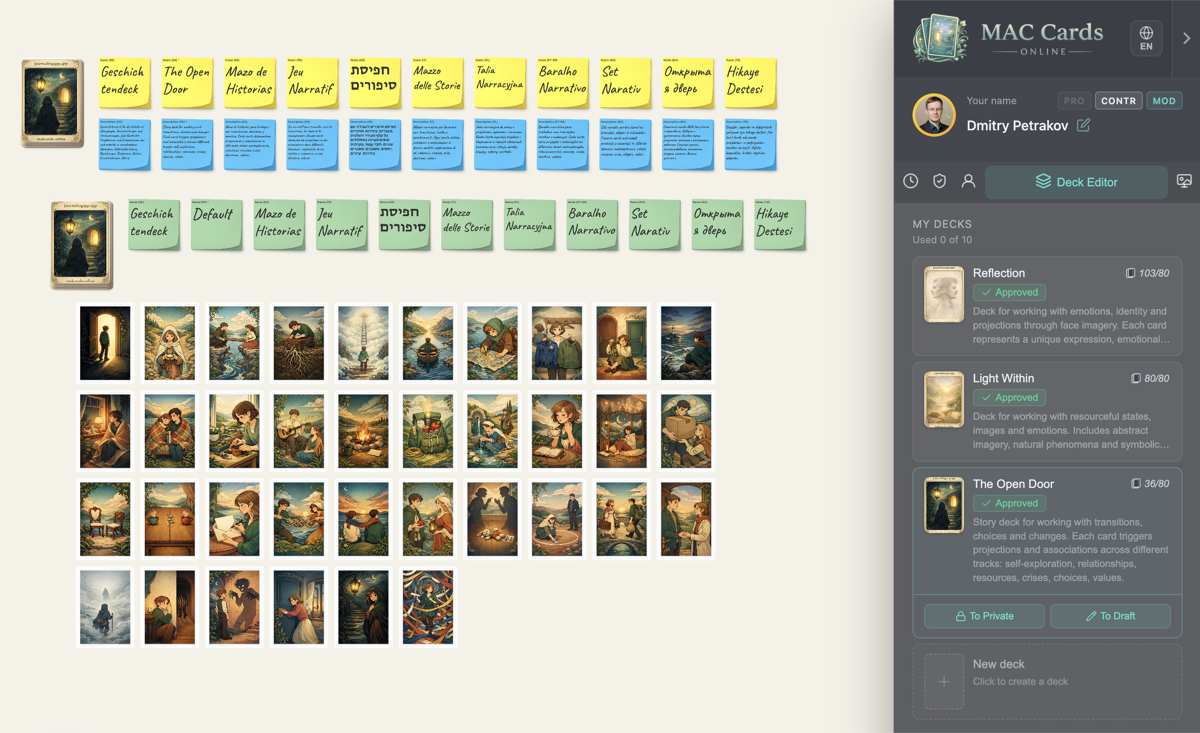
Two paths for creators
Choose what works for you – or combine both.
Publish on the platform
Submit your deck for moderation. Once approved, it appears in the public library where platform users can discover it. Your name is shown as the author. Great for visibility and building a reputation.
Sell directly
Accept payment wherever you already communicate – Telegram, Instagram, email, at a workshop. Generate an invite code on the platform and send it to the buyer. No store, no checkout page, no middleman.
You can do both: publish a deck for visibility and generate invite codes for direct sales at the same time.



Without the platform
- Physical deck production is expensive – printing, packaging, shipping
- Digital files leak the moment you send them
- No working environment – the buyer gets images, not a tool
- Need your own website, checkout, and delivery system to sell
With MAC Cards Online
- Platform handles hosting and image protection (tiling + watermark)
- Buyer gets a live online deck – ready to use in sessions
- Sell without a store – accept payment anywhere, send an invite code
- Publish to the public library after moderation for visibility
Sell without a store
You don't need a website, a payment system, or a checkout page. You just need your deck and a way to talk to your buyers.
Accept payment
Receive payment however you prefer – via Telegram, Instagram DMs, email, bank transfer, at a workshop, or any other way you already communicate with clients.
Generate invite code
Open the platform, go to your deck, and generate a one-time invite code. Choose Private (solo use) or Public (group sessions) access.
Send code to buyer
Send the invite code to your buyer – in the same chat where they paid you. Along with a link to the platform.
Buyer starts working
The buyer opens the platform, signs in with Google in one click, enters the code, and starts working with your deck immediately.
You set your own price. The platform doesn't process payments and doesn't take a cut of your sales. All the money goes to you.
What your buyer sees
From receiving the code to working with the deck – in three steps, no barriers.
Receives the code
After payment, you send the buyer an invite code and a link to the platform – via chat, email, or however you communicated.
Opens the platform, signs in with Google
The buyer opens the link in any browser, signs in with Google in one click, and enters the invite code. No separate registration, no installation.
Deck is ready
The deck is instantly available on the canvas. The buyer can draw cards, create sessions, invite participants, and take notes.
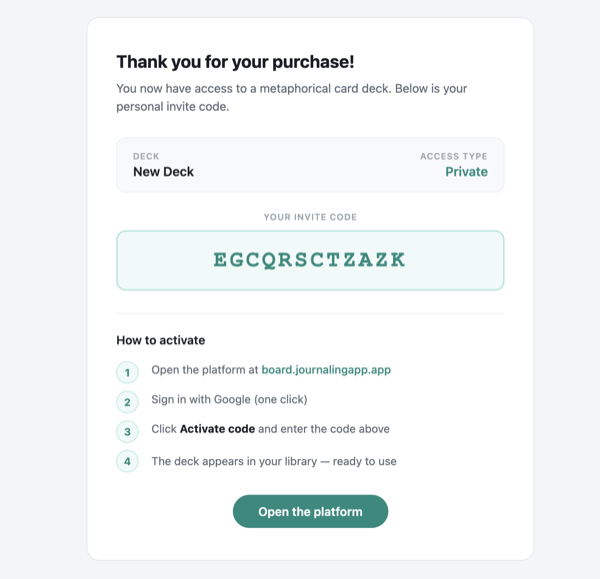 1. Receives the code
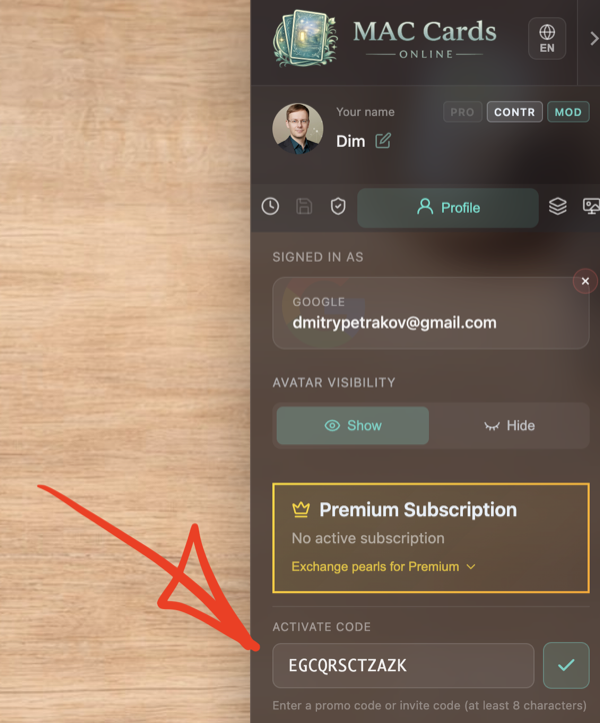 2. Entering the code
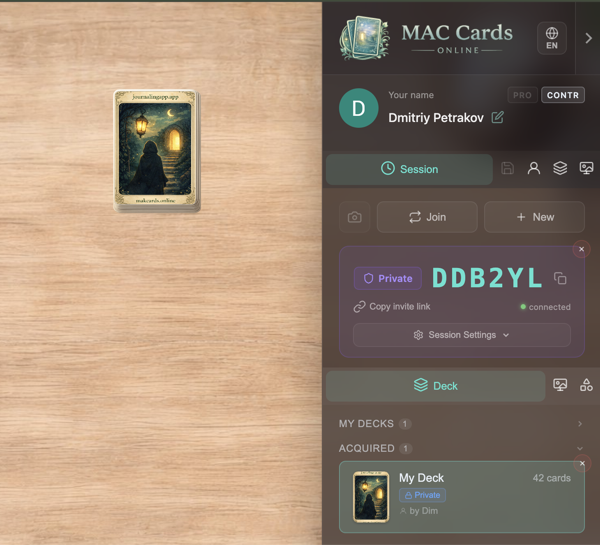 3. Deck ready
Why not just sell files?
Sending JPG or PDF files might seem simpler – but it comes with real costs.
Files leak
Once a buyer has the file, it can be copied, shared, or resold. You lose control the moment you hit "send". With invite codes, access is tied to a specific person and can be revoked at any time.
Files are a dead end
A downloaded archive sits on a hard drive. On the platform, buyers work with cards in a live environment – boards, rooms, sessions with other participants, notes, and chat. Your deck becomes a working tool, not a folder of images.
No control after the sale
Sold a file? You don't know who uses it or how many copies exist. With invite codes, you see every access point and can revoke or reissue. Your buyer gets a proper working environment – not just pictures.
Features for creators
Everything you need to create, publish, and sell MAC card decks.
Built-in deck editor
Upload card images, organize into groups (e.g. people, situations, resources), set card backs for each group. Add multilingual names and descriptions. Everything happens in the browser.
Publishing on the platform
Submit your deck for moderation. Once approved, it appears in the public library where platform users can find it. Your name is shown as the author.
Direct sales via invite codes
Generate one-time codes and send them to buyers. Accept payment anywhere you want – no store needed. Private (solo) or Public (group) access levels.
One-click buyer sign-in
Your buyer opens a link, signs in with Google in one click, enters the code, and starts working. No separate registration, no app to install – everything runs in the browser.
Image protection
Card images are split into 3×3 tiles (never served whole), watermarked, and rate-limited. No raw file downloads. DMCA/DSA takedown process built in.
Two access levels
Private – for solo use and personal practice. Public – for group sessions where the buyer can invite participants. Sell different levels at different prices.
All payments go to you
The platform doesn't process buyer payments. You sell at your price through your channels – and keep 100% of the revenue. The only platform cost is pearls for invite code generation.
How it works for creators
From your first upload to your first sale – in four steps.
Create your deck
Sign in, open the deck editor, upload card images. Organize cards into groups, set backs, add names and descriptions.
Publish or prepare for sales
Submit for moderation to appear in the public library. Or keep the deck private and sell directly via invite codes. Or both.
Get paid and issue code
Receive payment from your buyer through any channel. Then generate an invite code on the platform and send it to them.
Buyer starts working
The buyer opens the platform, signs in with Google, enters the code, and the deck is instantly available on the canvas.
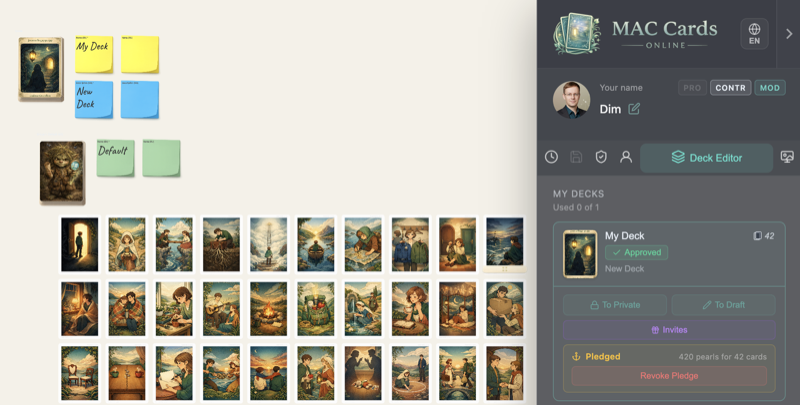 1. Deck editor
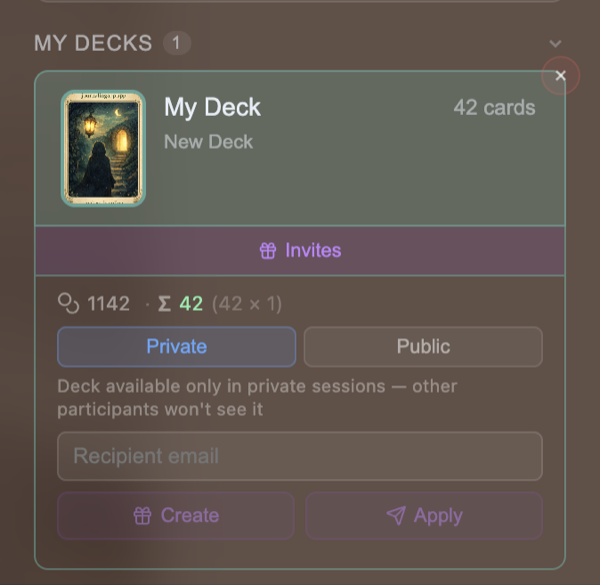 2. Access type
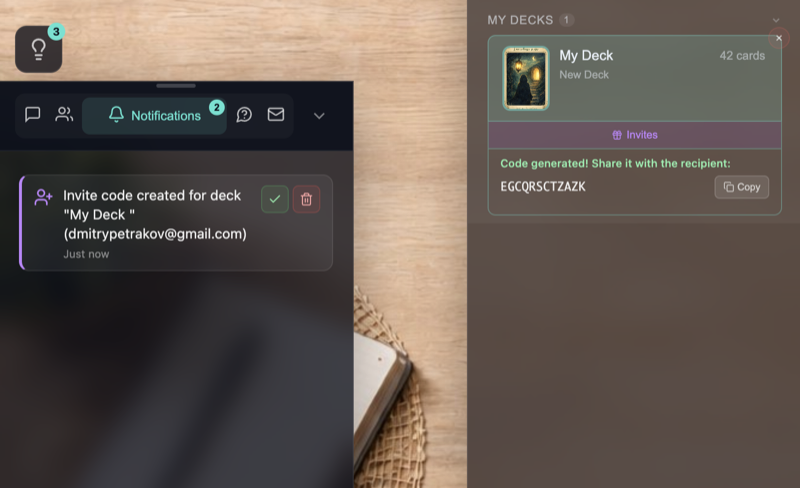 3. Code generated
4. Send to buyer
3. Code generated
4. Send to buyer
Author economics
Creating and publishing is free. The only platform cost is invite code generation.
How it works
- You sell at your own price – 100% of the payment is yours
- The platform doesn't process buyer payments or take commissions
- Invite codes are generated using pearls – the platform's internal currency
- Unused codes can be revoked – pearls are fully refunded
Where to get pearls
- Pearl Shop – buy pearls directly on the platform
- Deck Pledge – lock an approved public deck and receive 10 pearls per card (revocable at any time)
Account, deck editor, hosting, image protection, publishing, and moderation are all free.
Invite code cost
| Access type | Cost | Typical use case | What the buyer gets |
|---|---|---|---|
| Private | 1 pearl × cards in deck | Self-study, personal practice | Solo use – the buyer works with the deck in private sessions. |
| Public | 5 pearls × cards in deck | Psychologist, coach, facilitator | Full access – group sessions and rooms where other participants can join. |
Cost calculator
The platform cost is only for invite code generation. Based on current pricing. See the Pearl Shop for current prices.
Publishing & visibility
Publishing is the path to visibility on the platform.
Create your deck
Upload cards, organize groups, add descriptions in the deck editor.
Submit for moderation
Set the deck status to "Submitted". The moderation team reviews it for quality and content guidelines.
Appear in the library
After approval, your deck appears in the public library. Your name is shown as the author next to the deck.
Users find your deck
Platform users – psychologists, coaches, self-reflection practitioners – can discover and use your deck.
Already live
Not a concept – a working platform with real features you can use today.
Deck editor
Groups, bulk upload, card management
Image protection
Tiling, watermarks, rate limiting
Invite codes
Private & Public access levels
Public library
Publishing and author attribution
Real-time sessions
Collaborative boards, rooms, chat
OAuth login with Google
One-click sign-in for buyers
DMCA/DSA process
Formal takedown for violations
Browser-based
No installation for you or buyers
FAQ
Common questions from deck creators.
Creation & publishing
How do I create a deck?
How does publishing work?
How much does it cost to create a deck?
What are the minimum requirements?
Can I unpublish or delete my deck?
Sales
Can I sell without a store?
How much does an invite code cost?
Where do I get pearls?
Can I both publish and sell directly?
For buyers
Does the buyer need to register?
Does the buyer need to install anything?
Will it work on mobile?
Are my images protected?
What if a buyer loses their code?
Ready to start?
Create your first deck, publish it for visibility, or start selling directly – no store required.
Have questions? Write us on Telegram