

Sell digital MAC decks through your store – protected, controlled, instant
A secure digital sales channel for shops and publishers
Sell access to MAC card decks through your own store. Buyers sign in with one click and get instant access in the browser – no installation needed. You keep 100% of the revenue and full control over who gets access.
Who is this for
Whether you run an online store, a training center, or sell your own decks – this is your secure delivery channel.
Shop or publisher
Sell decks by multiple creators. Use manual delivery or automate via API for scalable, protected access.
Multi-author store
Aggregate decks from different creators in one catalog. API integration enables automated delivery at scale.
Training center or school
Issue Public access to students for group sessions. Ideal for workshops, courses, and supervised practice.
Creator with own website
Sell your own decks through your site. Protected delivery and an online working environment for every buyer.
Selling files
- Files get copied and shared – no way to prevent leaks
- No control over who uses the deck after the sale
- Buyer gets a static archive, not a working tool
- No image protection for your artwork
Selling protected access
- Buyer gets an online deck – ready to use in sessions, rooms, and boards
- You control who gets access via invite codes
- Images are protected with tiling, watermarks, and rate limiting
- Buyer starts instantly – one-click sign-in, no installation
Why sell through MAC Cards Online
A secure sales channel where you stay in full control of your decks, customers, and revenue.
Your store, your revenue
Payments go directly to you – not through the platform. You set the price, choose how to sell, and keep 100% of the revenue. No marketplace commission.
Zero-friction access for buyers
Your buyer opens a link, signs in with Google in one click, enters the invite code, and starts working with the deck immediately. No separate registration, no app to install. One of the lowest-friction ways to deliver a digital MAC deck.
You decide who gets access
Only you control who receives an invite code. No public marketplace – your customers come from your sales channels.
Not a file – a working environment
Buyers don't get a static archive. They get a live deck on a platform with boards, rooms, sessions, chat, notes, and collaborative tools.
Two access levels
Private – for solo use. Public – for group sessions with participants. Sell different levels at different prices.
Three ways to sell
Generate codes manually through the interface, automate via REST API, or combine both. Start without a developer, scale with one.
Built-in content protection
Card images are split into tiles, watermarked, and rate-limited. No raw file downloads. DMCA/DSA takedown process included.
Why not just sell files?
Sending PDF or JPG files might seem simpler – but it comes with real costs.
Files leak
Once a buyer has the file, it can be copied, shared, or resold. You lose control the moment you hit "send". With invite codes, access is tied to a specific person and can be revoked at any time.
Files are a dead end
A downloaded archive sits on a hard drive. With the platform, buyers work with cards in a live environment – boards, rooms, sessions with other participants, notes, and chat.
No control after the sale
Sold a file? You don't know who uses it or how many copies exist. With invite codes, you see every access point, can revoke or reissue, and your buyer doesn't need separate software – they start working in the browser immediately.
Already have your own store?
We don't replace your store – we add a secure delivery layer on top of it.
We complement, not compete
- Payments stay in your store – we never touch buyer money
- Customers come from your channels – we don't have a public marketplace
- We handle the hard parts: hosting, image protection, delivery, and online working environment
How fast can you launch?
- Start with manual delivery this week – no developer needed
- Pilot with 1–2 decks before committing your full catalog
- Switch to API or hybrid mode when volume grows
- Works with any platform: Tilda, WooCommerce, InSales, or your own checkout
Three ways to start selling
Choose the approach that fits your setup – and change it as you grow.
Manual
Generate invite codes through the web interface and send them to buyers yourself – via email, messenger, or your store dashboard.
Best for: starting out, small volume, testing the flow.
Setup: minutes. No developer needed.
API
Your store calls a single endpoint on purchase. The platform returns an invite code, and your system delivers it to the buyer automatically.
POST /api/v1/public/invite-codes
{ "deck_id": "...", "recipient_email": "...", "access_type": "private" }
→ { "code": "XXXX-XXXX", "status": "active" }
Best for: automated checkout, high volume.
Setup: hours to days, based on typical scenarios during beta.
Hybrid
Use manual delivery for some products and API for others. Start manual, then migrate individual decks to automated flow as needed.
Best for: stores with mixed catalog, gradual adoption.
Setup: start manual now, add API per product later.
How your store starts selling in 4 steps
From upload to first sale – a simple path you can start this week.
Upload your deck
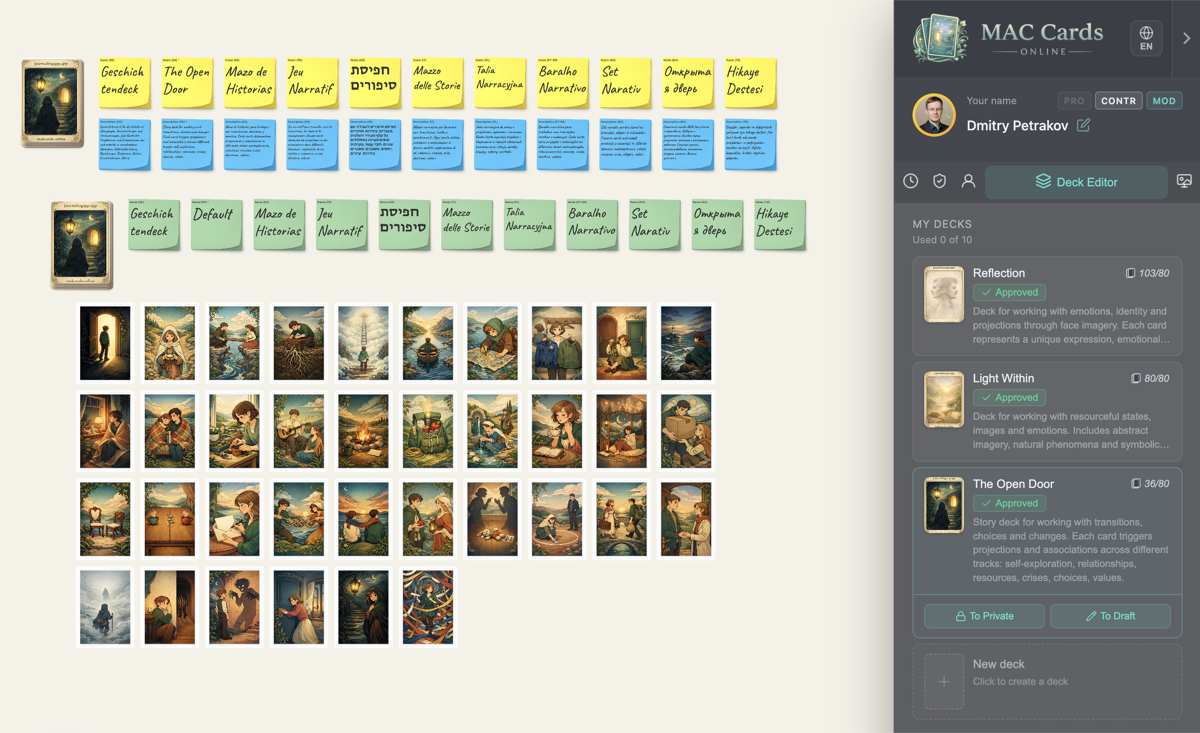
Create an account, open the deck editor, and upload card images. Organize cards into groups if needed.
Choose access type
Decide whether to offer Private (solo use) or Public (group sessions) access – or both at different prices.
Generate invite codes
Create codes manually through the interface or connect your store via API for automated delivery.
Send to buyer
Deliver the code to your customer – by email, messenger, or your store dashboard. They start using the deck instantly.
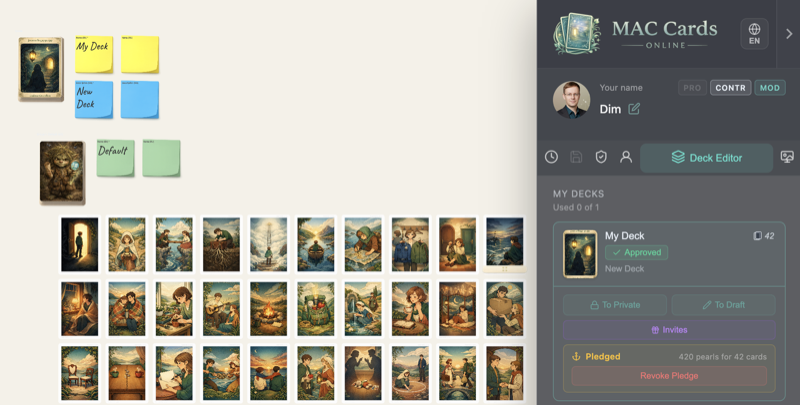 1. Deck editor
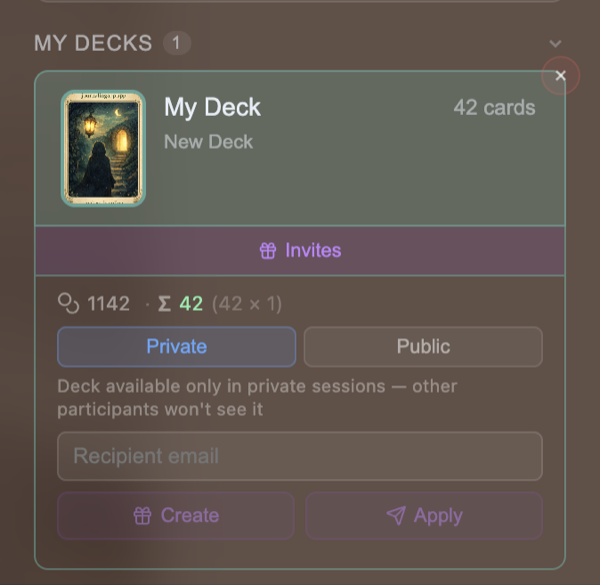 2. Access type
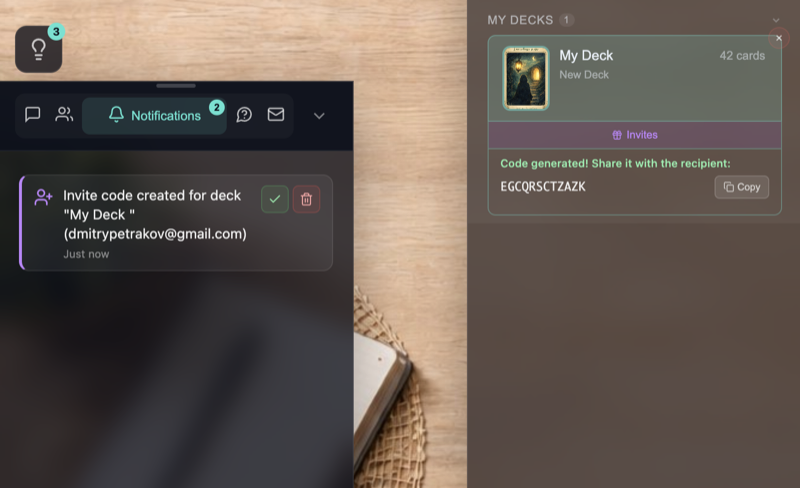 3. Code generated
 4. Email to buyer
What your buyer sees
From purchase to first use – in three steps, no barriers.
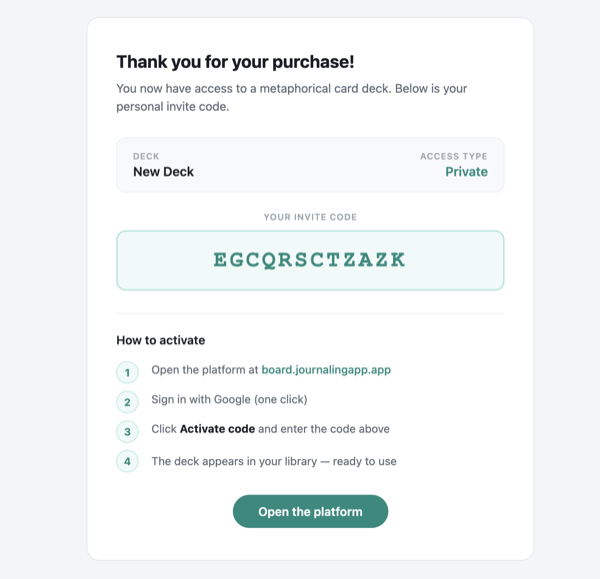
Receives the invite code
After purchase, your store sends the buyer an invite code – via email, messenger, or your dashboard.
Opens the platform
The buyer opens the link in any browser, signs in with Google in one click, and enters the invite code. No separate registration, no installation.
Starts working with the deck
The deck is instantly available on the canvas. The buyer can draw cards, create sessions, invite participants, and take notes.
1. Invite code email
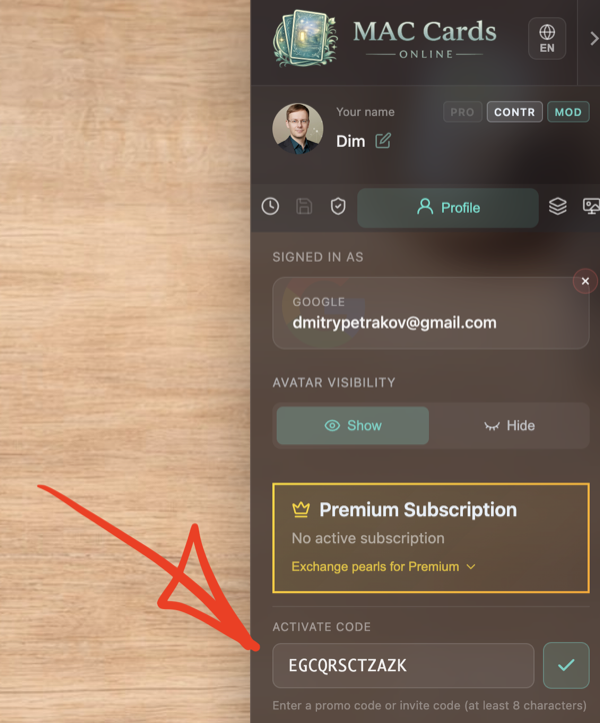 2. Entering the code
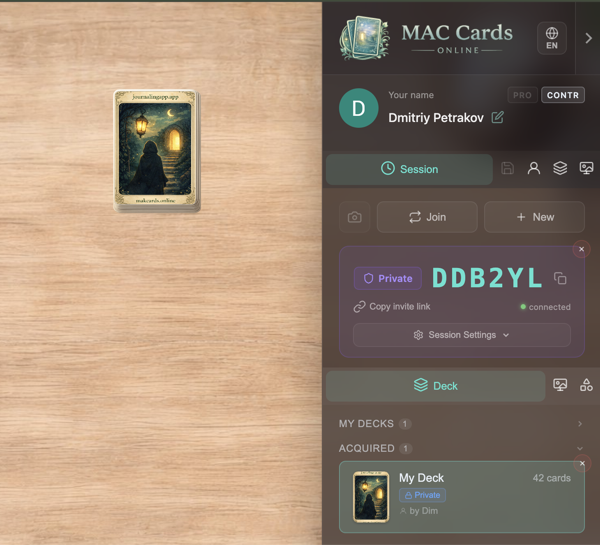 3. Deck ready
How does it compare?
Four ways to sell digital MAC decks – and what each gives you.
| Raw files (PDF/JPG) | Marketplace | Custom build | MAC Cards Online | |
|---|---|---|---|---|
| Revenue control | 100% | Platform commission | 100% | 100% |
| Content protection | None | Varies | You build it | Tiling + watermark + rate limiting |
| Post-purchase control | None – file is out | Depends on platform terms | Full, if you build it | Revoke, reissue, status tracking |
| Buyer onboarding | Download – low friction, no protection | Varies | Depends on your build | Browser, one-click sign-in, instant |
| Collaborative sessions | No | Rarely built in | You build it | Built-in real-time sessions |
| Integration effort | None | Varies | Months of development | Minutes (manual) to days (API)* |
| IP protection & takedown | None | Varies | You build it | DMCA/DSA process built in |
* Based on typical setup scenarios during beta. Manual mode requires no technical integration.
Full control after the sale
Manage access – not files. Every invite code is trackable and controllable.
Reissue lost codes
Buyer lost the code? Revoke the old one and generate a new one in seconds.
Revoke unused codes
Unused invite codes can be revoked at any time. Pearls are fully refunded to your balance.
Track code status
Check whether a code is active, used, or revoked – through the interface or via API.
Private or Public
Issue Private codes for solo buyers or Public codes for group sessions. Different use cases, different prices.
Rights-controlled delivery
You decide who gets access. No one can use your deck without an invite code from you.
Pricing that keeps you in control
You set the price for your buyers. The platform only charges for invite code generation.
How it works
- You sell through your store at your price – 100% of the payment is yours
- The platform doesn't process buyer payments or take commissions
- Invite codes are generated using pearls – the platform's internal currency
- Unused codes can be revoked – pearls are fully refunded
What's included free
- Account and deck editor
- API key and full REST API access
- Hosting, image protection, and delivery
- Content moderation and takedown process
Invite code cost
| Access type | Cost | Typical use case | What the buyer gets |
|---|---|---|---|
| Private | 1 pearl × cards in deck | Self-study, personal practice | Solo use – the buyer works with the deck in private sessions. |
| Public | 5 pearls × cards in deck | Psychologist, coach, facilitator | Full access – group sessions and rooms where other participants can join. |
Example: a 50-card deck costs 50 pearls (≈$0.27) for Private or 250 pearls (≈$1.36) for Public per invite code. If you sell Private access for $10, your platform cost is under 3%. Illustrative – based on current beta pricing. See the Pearl Shop for current prices.
Cost calculator
You set your own price for buyers – the platform cost is only for invite code generation. Based on current beta economics.
Already live in beta
Not a concept – a working platform with real features you can use today.
Deck editor
Groups, bulk upload, card management
Image protection
Tiling, watermarks, rate limiting
Invite codes
Private & Public access levels
REST API
API keys, automated delivery
Real-time sessions
Collaborative boards, rooms, chat
OAuth login
Sign in with Google
Moderation & takedown
DMCA/DSA process built in
Browser-based
No installation for you or buyers
FAQ
Common questions from shops, training centers, and publishers.
Business
Do I need technical skills?
How do I price my decks?
Can I sell decks by other creators?
What if a buyer wants a refund?
For buyers
Does the buyer need to register?
Does the buyer need to install anything?
How quickly can a buyer start after purchase?
Will it work on mobile devices?
Technical
Do I need an SDK?
Is there a sandbox for testing?
What if the buyer lost their code?
Can I track code usage?
Minimum cards in a deck?
Ready to start selling?
Launch your secure digital sales channel – start with manual delivery this week or integrate via API.
Want to discuss integration? Write us on Telegram