

Run MAC sessions online — individually and in groups
A professional tool for therapists and coaches
Shared board in real time, anonymous notes for a safe space, and one link to invite everyone. No installation needed.
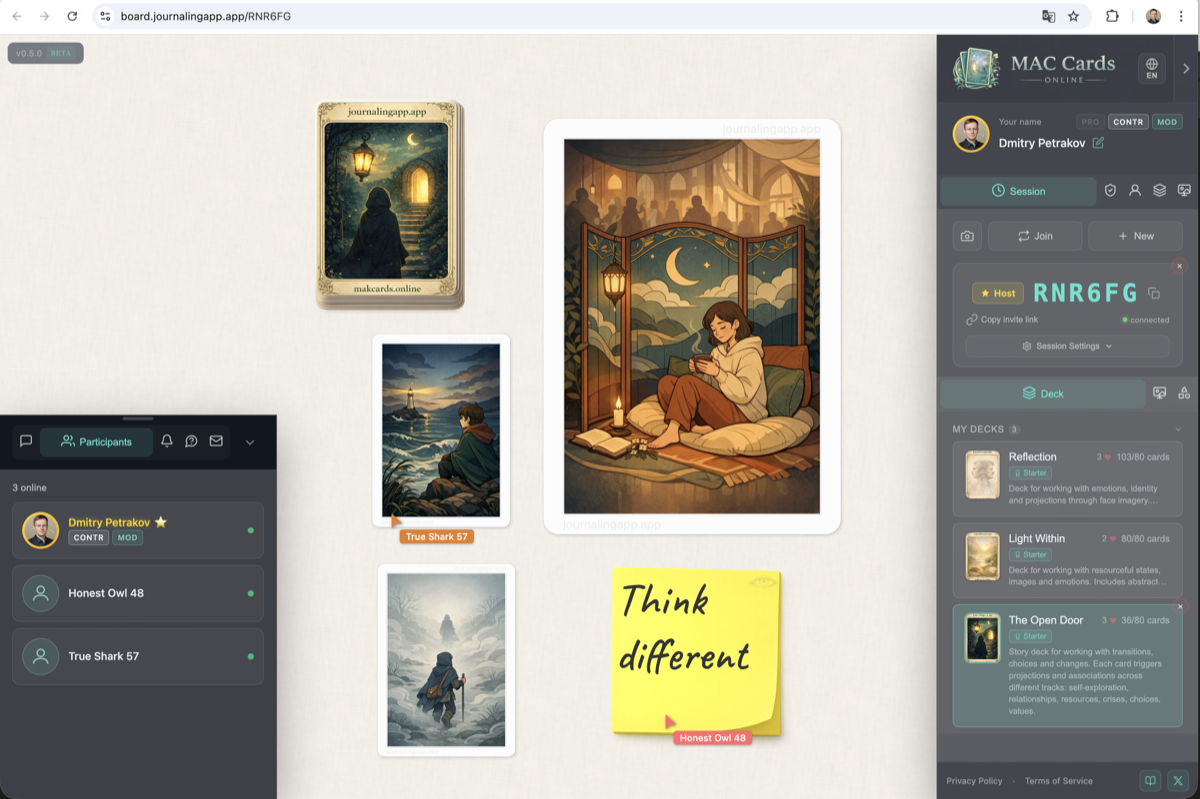
Before and after
What changes when you bring your practice onto a shared board.
Without the platform
- Showing cards through the camera — clients can't interact
- No way for clients to draw or move cards themselves
- Missing safe space for honest sharing
With MAC Cards Online
- Shared board — client draws and moves cards
- Anonymous notes — everyone sees text, only you see the author
- One link — no installation or sign-up needed
Features for professionals
Everything you need to run MAC sessions with clients — from real-time collaboration to PRO status.
Real-time collaboration
Everyone sees the same board. Client draws and moves cards. You control session settings.
Flexible modes
Per-group or shared deck. Blind or open draw. Switch modes during the session.
Anonymous notes
Client writes thoughts — everyone sees the text. Only you (the host) see who wrote what. Safe space for self-expression.
Room variety
Group table (infinite board). Self-reflection rooms (cozy space). Create your own rooms for each technique.
Chat & participants
Built-in text chat. See who's connected. History of last 100 messages.
Transformational games
Tokens (5 colors) and dice for T-Games. Server-generated rolls. Collectible items for atmosphere.
PRO status
Free status for verified practicing psychologists. PRO badge, +5 slots, advanced session settings: room password, hide cursors, "move own only" mode.
How it works
From creating a room to anonymous notes — in four simple steps.
Create a session
Choose a room and a deck that fits your technique.
Share the link
Send it to your client or group — they join with one click.
Work together
All actions are visible in real time. Draw, move, discuss.
Anonymous notes
Client writes thoughts, you see who wrote what.
Pricing
Start for free. Expand as you grow your practice.
Free
- All basic features
- Sessions and real-time sync
- Public decks, notes, chat
- Tokens and dice
Free
- Create decks and rooms (1+1)
- Buy author decks
- Personal dashboard
Premium + PRO
- Advanced session settings
- Password, hide cursors, "move own only"
- Up to 15 decks + 15 rooms
- PRO — free for verified psychologists
FAQ
Answers to common questions from psychologists and coaches.
Is this free?
Can clients see each other's notes?
How many participants?
Can I use my own decks?
How to get PRO status?
Is client data safe?
Ready to try?
Create a room and invite your client — no sign-up, no installation.