

Create MAC decks and earn from your art
Your cards — your rules
Built-in editor, publishing for everyone or sales via invite codes. The platform handles hosting, image protection, and delivery.
Without the platform
- Physical deck production is expensive (printing, shipping)
- Digital sales need your own site + protection from copying
- No built-in audience or delivery system
With MAC Cards Online
- Platform handles hosting and image protection (tiling + watermark)
- Delivery via invite codes — buyer enters a code and gets access
- Built-in audience of therapists and self-reflection practitioners
Features
Everything you need to create, publish, and monetize your MAC card decks.
Built-in deck editor
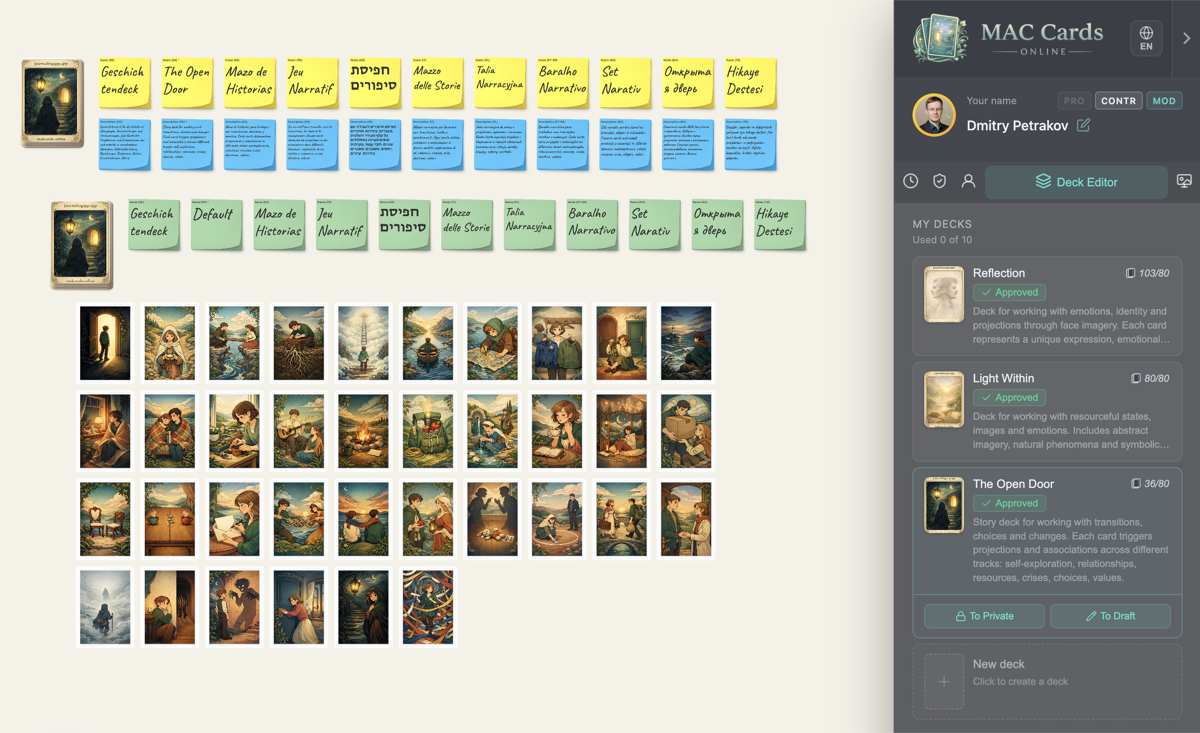
Upload card images. Groups (people, situations, resources). Backs for each group. Multilingual names and descriptions.
Statuses & publishing
Draft → Private → Submitted → Approved. Moderation before publishing. Private decks for personal use.
Invite code monetization
Generate one-time codes for each buyer. Two access types: private (cheaper) and public. Cost: 1 pearl/card (Private), 5 pearls/card (Public). Payment from buyer happens outside the platform.
Pearls — internal currency
Earn through promo codes from the platform. Earn through Deck Pledge (lock a deck = 10 pearls x cards). Spend on invite code generation.
Deck Pledge
Lock an approved public deck. Get 10 pearls per card. Deck can't be edited (buyer guarantee). Revoke anytime (return pearls).
Image protection
3x3 tiling (cards never served whole). Invisible watermark for tracing. Rate limiting. DMCA/DSA/Russian law takedown process.
Room editor
Create themed spaces for your decks. 6 fixed positions for card stacks. Atmospheric backgrounds.
How it works
From sign-up to your first sale — in four steps.
Sign up
Open the deck editor in your profile.
Upload images
Set up groups, backs, and descriptions.
Publish
Make it public (moderation) or keep private.
Generate codes
Create invite codes and send to buyers.
How the process works
From creation to delivery — the full picture.
Author                Platform              Buyer
  |                      |                    |
  |-- Creates deck ----->|                    |
  |-- Publishes -------->|<-- Moderation      |
  |                      |                    |
  |-- Spends pearls --->|--- Generates code ->|
  |<-- Payment outside platform -------------|
  |                      |<-- Activates code --|
  |                      |--- Deck access ---->|
Pricing
Start for free — grow as you publish.
Free
- 1 deck + 1 room
- Editor and publishing
- +1 slot per approved deck
Premium
- Up to 10 decks + 10 rooms
- Full editor features
- Marketplace access
PRO
- +5 extra slots
- PRO badge
- Advanced session settings
FAQ
Common questions from deck creators.
How much does it cost to publish?
Where do I get pearls?
What is Deck Pledge?
How do buyers get access?
Are my images protected?
Can I delete my deck?
Ready to create?
Your deck could be the next favorite among therapists and practitioners.